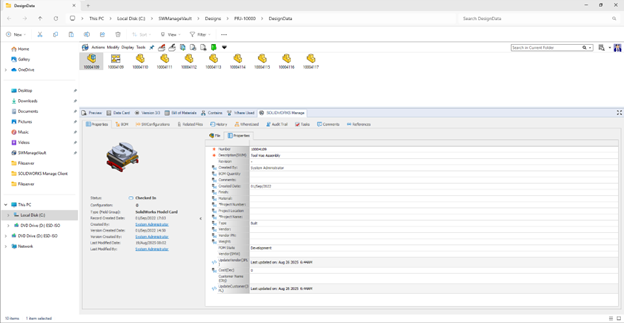
SOLIDWORKS PDM has been a staple for engineers who need to manage their CAD design data for years. The idea of having your revision control directly inside of Windows Explorer, the ability to view your parts and assemblies without having to open SOLIDWORKS, and knowing where those parts are being used by looking at a tab are just a handful of reasons why SOLIDWORKS PDM is our favorite data management tool. This incredible functionality can be extended by utilizing the SOLIDWORKS Manage add-in for SOLIDWORKS PDM.
Sometimes we need to do even more with our data, and we need to create tasks or have our parts be used in complex, configured shipping bill of materials built off the CAD BOM. This is where having a system like SOLIDWORKS Manage can take your data management and engineering data to the next level.
What Is The SOLIDWORKS Manage Add-in?
The SOLIDWORKS Manage Add-in is built directly inside of your PDM vault, where your other tabs are found. It adds to SOLIDWORKS PDM functionality by giving information about our data directly from the SOLIDWORKS Manage vault. It gets installed with the PDM Administrator, where Dispatch and other customized Add-ins are located.
 SOLIDWORKS Manage add-in tab in the PDM vault
To learn more about installing the SOLIDWORKS Manage add-in for SOLIDWORKS PDM, read our blog here.
Bill of Material Configurations
We all know and love the ability to see our SOLIDWORKS BOMs inside of PDM, but with Manage, we can take that a step further. Manage allows us to control complex BOMs while still keeping core SOLIDWORKS parts and assemblies referenced.

Viewing the different configured BOMs in SOLIDWORKS PDM
Where PDM we have engineering BOMs, but in Manage we can have shipping, manufacturing, and country-specific bills of materials with items like paint, glue, and wire represented. When you create these different configurations of BOMs, you can then easily see them inside of PDM through the SOLIDWORKS Manage add-in.
Task Management
One of the strongest features of SOLIDWORKS Manage is the ability to create and assign tasks. This allows project managers and other stakeholders to know where projects are, how much time we think it will take to finish a project, and more valuable information.

Showing tasks related to a specific assembly
Just as important, it also allows users to know what they are expected to do. Tasks in Manage can be created in many different ways, either by automation or manual entries. The PDM add-in can show you what tasks are referencing the files in the vault. You no longer have to wonder what tasks have to be done for what part file.
SOLIDWORKS PDM and SOLIDWORKS Manage Working Together
While PDM is the best at managing your data, Manage takes it a step further by managing your entire engineering process. When you have your add-in installed, you open up more right-clicking menus than ever before.
We can do things like start tasks directly from inside PDM in Windows Explorer. We can also send different files to different processes directly, or run reports on them. The two programs truly build off one another and give you true control and visibility to not only your design data but also your entire design and manufacturing process.
Getting Started with SOLIDWORKS Manage
This is just scratching the surface of the relationship between PDM and Manage. The PDM add-in has configuration visibility, audition capability, comments, and more. Our Professional Services team has the skills to help you either elevate what you are currently using or start from scratch and get your design data to do even more for your company. Data control and company processes can be difficult, so let us help.
Want to improve your processes with SOLIDWORKS Manage? Take a look at our implementation services here.
Cloud Software
Berita Olahraga
Lowongan Kerja
Berita Terkini
Berita Terbaru
Berita Teknologi
Seputar Teknologi
Berita Politik
Resep Masakan
Pendidikan
