In plastic part manufacturing, warpage is a common yet costly issue to fix. Warpage occurs when uneven shrinkage during cooling causes a part to deform from its intended shape. This deformation can lead to assembly issues, aesthetic defects, and functional failures.
To address this, engineers use warp analysis and reverse mapping techniques to understand and compensate for these deformations. SOLIDWORKS Plastics Premium can be used to analyze warpage. The useful insights derived from this can help reverse-engineer deformed parts into accurate CAD models for tooling or redesign.
What Is Warp Analysis?
Warp analysis in SOLIDWORKS Plastics Premium predicts how a plastic part will deform after molding. It is calculated taking into account the material properties (e.g., shrinkage, thermal expansion), cooling rates, mold design, gate locations, and associated flow paths. The result is a warped shape that can be compared to the original CAD geometry. This helps engineers identify problem areas and optimize the mold or part design.
What is Reverse Mapping?
Reverse mapping is the process of taking a deformed (warped) part and determining the original shape that would result in the desired final geometry after warping. Simply put, reverse mapping involves applying the inverse of the warp deformation to the scanned geometry, effectively “unwarping” it.
This is particularly useful when a physical part has been reverse-engineered with 3D scanning and shows warpage. It can also be used when creating a mold that compensates for the expected deformation or when you need to reverse-engineer tooling from a deformed shop-floor part.
Warp Analysis in SOLIDWORKS Plastics
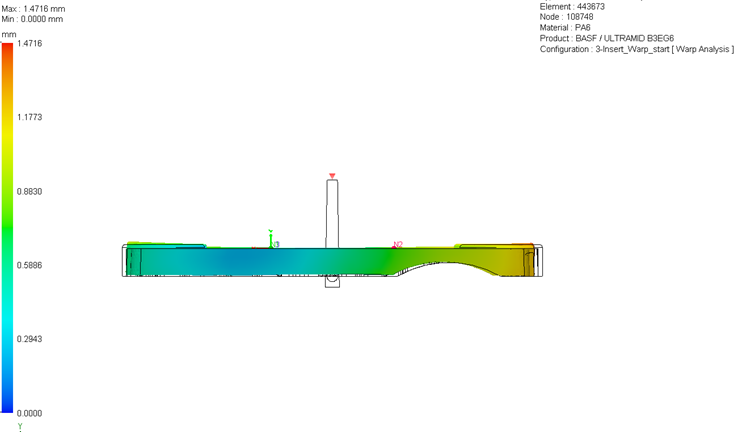
The Warp Analysis in SOLIDWORKS Plastics Premium provides an exceptional option to automatically generate a model that compensates for the warpage. Once a warp analysis is completed, Warp Analysis results such as total deformation, deformation due to in-mold residual Von Mises stress, quenching thermal deformation, deformation due to filler material orientation, and differential cooling can be determined.
 Final deformation from a Warp Analysis
The warped or deformed shape can be exported from the Warp Analysis result either as a new configuration or as a new part file. The advanced export options give the option to save the deformed shape as a solid body, tessellated surfaces or individual surfaces.
Leveraging Reverse Warp
Within the save Body from Deformed Shape Property Manager, there is an option to create body from Reverse warp. Generating deformed body with Reverse warp option is useful when you are looking to compensate for warpage. This will export the shape with necessary geometry to cut into the mold to counteract the predicted warpage.

Saving the deformed body with a Reverse warp
This helps in mold cutting with compensation for warping, which in turn leads to better accuracy of the final part. Image below shows the automatically generated solidbody with compensation to accommodate for the warping. This feature is a time saving option as users don’t have to copy or knit the surfaces bodies manually.
The image below shows part generated with reverse warp feature overlaid with original part geometry. It shows the deformation of the part and modification needed to account for warping.

Comparing original CAD to warped result
Summary of the Reverse Warp Process
To summarize, the workflow for reverse warp process consists of the following:
- Run a Warp Analysis to simulate deformation caused by residual stress generated from the fill, pack and cooling stages.
- Generate Reverse Warp geometry to generate a model with compensation allowed for warpage. The model generated is geometrically altered in the direction opposite to that of predicted deformation.
- Export the compensated model and validate it in SOLIDWORKS. This can be geometry validation or rerunning simulation studies.
Warp Analysis and reverse warping are essential tools in modern plastic part design and manufacturing. By leveraging SOLIDWORKS Plastics Premium, engineers can not only predict warpage but also reverse-engineer accurate CAD models from deformed parts. This leads to better tooling, higher quality products, and more efficient workflows for faster product innovation.
To learn more about reducing plastic warping, watch our on-demand webinar here.
Cloud Software
Berita Olahraga
Lowongan Kerja
Berita Terkini
Berita Terbaru
Berita Teknologi
Seputar Teknologi
Berita Politik
Resep Masakan
Pendidikan
