The SOLIDWORKS User Forums are a treasure trove of tips, tricks, and real-world insights shared by industry experts from around the globe. Now it’s easier than ever to tap into that knowledge right from inside the software!
What is the SOLIDWORKS User Forum?
The SOLIDWORKS User Forum is a place where everyday users, enthusiasts, and SOLIDWORKS veterans come together to share ideas and solve problems. The forums have tags for different areas you might want to discuss, and offer robust search functionality to easily find like-minded users.
From the same interface, you can also access other valuable communities like SOLIDWORKS Enhancement Ideas. Here, users can submit suggestions for new features or vote on existing ideas. By streamlining the feedback process, this new setup empowers more users to contribute, giving the SOLIDWORKS Research and Development team better data on where to focus their efforts.
How to Access the SOLIDWORKS Forums
While the forums are still accessible via the web through the SOLIDWORKS User Forum site, a new integration in SOLIDWORKS 2025 brings them directly into the Task Pane inside of the SOLIDWORKS user interface. This means you can ask questions, browse discussions, and find solutions, all without breaking your design flow.
To access the SOLIDWORKS User Forums inside SOLIDWORKS:
- In SOLIDWORKS, click Help (?) and then User Forum.
 Accessing the SOLIDWORKS Forum from the Help menu
 - The SOLIDWORKS User Forum opens in the Task Pane, prompting you to log in. Enter your 3DEXPERIENCE ID login information or create a free account.
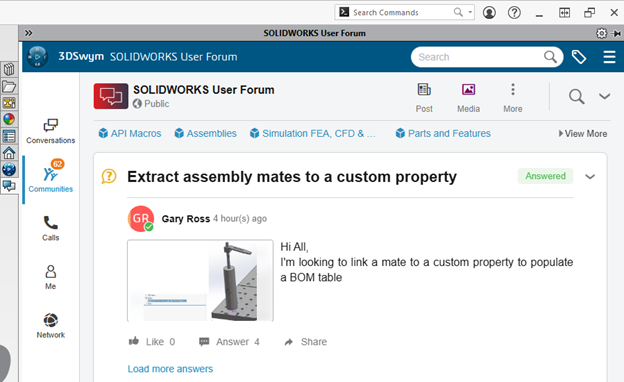
- The SOLIDWORKS User Forum opens in the Task Pane, allowing you to navigate the same way you would from a web browser.
 SOLIDWORKS User Forum in the SOLIDWORKS Task Pane
With advanced filtering functions, users are able to efficiently browse, search, and filter forum posts to locate answers to their questions or enhance their knowledge by accessing discussions by participants from around the world. For more information on usability tips specific to the SOLIDWORKS User Forums, see our blog article on SOLIDWORKS User Forum joins the 3DEXPERIENCE Swym Communities.
How to Access the SOLIDWORKS Enhancements Community
Every new version and service pack of SOLIDWORKS is filled with updates and ideas brought to our attention by everyday users like you! The best way to make an impact on the future of SOLIDWORKS is by participating in this community, and now you can do this without switching windows.
To access SOLIDWORKS Enhancement Ideas, click on Communities and search for “enhancements”. After clicking on the community, instructions will be presented to detail how to search for existing ideas and submit a new one.

Accessing the SOLIDWORKS Enhancement community
Making the Most of the SOLIDWORKS User Forum Integration
The SOLIDWORKS User Forum interface may be new to some, as it runs on top of the 3DSwym application on 3DEXPERIENCE, unlike its predecessor. It’s not only visually different than the old SOLIDWORKS User Forum, but it brings along some new features and tools such as the integration with SOLIDWORKS, filtering, and enhancement ideas.
However, it has never been easier to access, search, and participate in the SOLIDWORKS User Forum. The forum is among the many advantages offered by the 3DEXPERIENCE platform, which can be accessed via the SOLIDWORKS interface.
To learn what else you can do with 3DEXPERIENCE, read our blog here.
Cloud Software
Berita Olahraga
Lowongan Kerja
Berita Terkini
Berita Terbaru
Berita Teknologi
Seputar Teknologi
Berita Politik
Resep Masakan
Pendidikan
