
Have you ever been working on an assembly and realized that you weren’t working with the most recent files/changes to sub-components? With SOLIDWORKS PDM you can ensure every time you open a file with subcomponents, those sub-components are always referencing the most recent version in the vault with the “Always work with the latest version […]
Category: Uncategorized

What is CircuitWorks?
CircuitWorks is a translator bridge for SOLIDWORKS. It allows SOLIDWORKS to open files produced by Electrical CAD software for Printed Circuit Board (PCB) design. Upon opening the file, SOLIDWORKS will create an assembly model of the PCB. CircuitWorks also allows SOLIDWORKS to save changes back to files to be imported in the electrical design software. […]

Top Three SOLIDWORKS 2025 Enhancements
The release of SOLIDWORKS 2025 enhancements brings exciting updates designed to enhance productivity and usability. After upgrading, three features stood out immediately to me, and I wanted to share those changes on here with some explanations of what these changes really mean. 1. Inheriting Default File Locations One of the most convenient updates in SOLIDWORKS […]

How to Move a SOLIDWORKS License: Deactivating vs Disabling
There comes a time when you may need to move a SOLIDWORKS license to a new machine. This can be for something as simple as upgrading to a faster machine or in the wake of an unfortunate system crash. This can also apply to software like Visualize or Composer. When you move a SOLIDWORKS license there’s […]
How to Move a License in SOLIDWORKS: Deactivating vs Disabling
There comes a time when you may need to move a license of SOLIDWORKS to a new machine. This can be for something as simple as upgrading to a faster machine or in the wake of an unfortunate system crash. This can also apply to software like Visualize or Composer. When you are moving a […]

Increase Your Efficiency with the SOLIDWORKS User Interface
We all want more efficiency, especially when it comes to work. The faster you can get your job done, the faster you can move on to another task, be it the next hot project, or a little quality time with your phone. The good news is more coffee is not your only option! The SOLIDWORKS […]

How to Export All Data from 3DEXPERIENCE
Backing up your data is always a good policy. 3DEXPERIENCE includes cloud-based file storage already, but if you want to create an on-site backup then keep reading. For exporting an individual project, we recommend you export all data as a package. But what if you want to back up ALL of your data? Here is […]
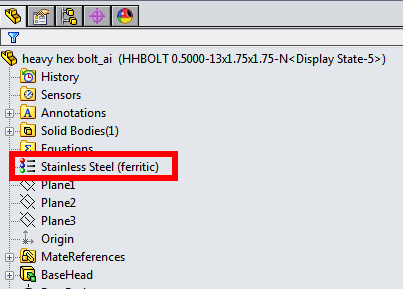
Linking Toolbox Custom Property to SOLIDWORKS Materials
A Toolbox custom property can be linked to SOLIDWORKS materials library using the list option. SOLIDWORKS material in a Toolbox part The material selected in the Toolbox configurator gets applied to the Toolbox part and the custom property can be displayed in the BOM. Only one Toolbox property can be linked to SOLIDWORKS materials library. […]
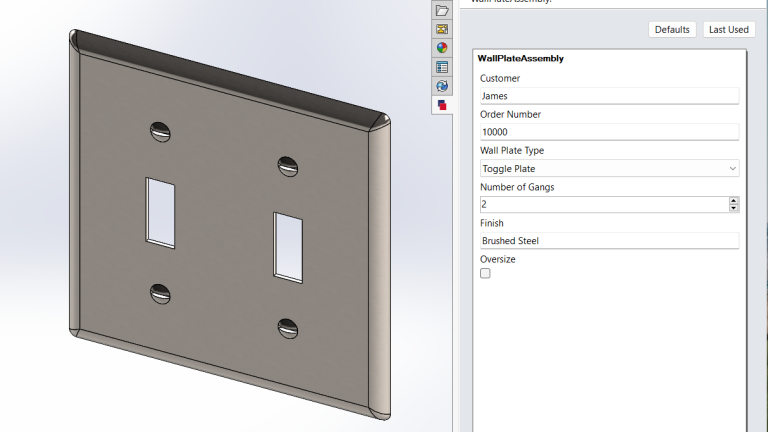
Choosing the Best Form Controls
DriveWorksXpress automates the generation of SOLIDWORKS models and drawings by creating variations of a master model. Variations of the Master Model DriveWorksXpress Form Once you have your master model, with all of the necessary information captured, you are ready to design your form. DriveWorksXpress uses data entered into a form to drive the dimensions, features, […]

Mise en place d’un assistant avec l’IA : Bilan
Dans nos articles précédents, nous avons décrit la mise en place d’un agent conversationnel qui assiste nos collaborateurs dans leurs tâches quotidiennes en utilisant notre base de connaissances interne. Nous avons développé cet agent lors de notre hackathon annuel. Pour ce faire, nous nous sommes inspirés de l’architecture « Retrieval Augmented Generation » et avons adopté la […]