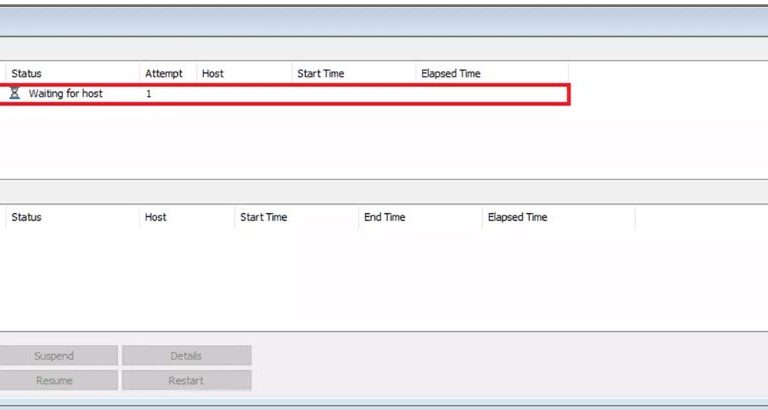
In SOLIDWORKS PDM, tasks running within the system may occasionally become unresponsive and fail to progress. When SOLIDWORKS PDM tasks stall out, it is necessary to cancel the stuck tasks from the Task List.
This guide provides a step-by-step approach to resolving such issues using the SOLIDWORKS PDM Administration Tool and SQL Server Management Studio. The following sections will outline the procedure to terminate this task in the event it becomes stuck.
Understanding Task Statuses in SOLIDWORKS PDM
Each status in the Task List is associated with a numeric value ranging from 1 to 11. The table below outlines all possible task statuses along with their corresponding numeric values:
- 1 – Waiting for Host
- 2 – Starting Up
- 3 – In Process
- 4 – Retrying
- 5 – Suspended
- 6 – Cancelling
- 7 – OK
- 8 – Cancelled
- 9 – Failed
- 10 – Suspending
- 11 – Resuming
Identifying a Stuck Task
Generally speaking, a task can be considered stuck if it has not fired in a reasonable amount of time or takes significantly longer than normal. At this point, you will need to enter the Task List and find the status of the task.
 A convert task is stuck in the Task List
In the screenshot below, the “Convert” task is displayed with the status Waiting for host. Based on the previously provided list, this status corresponds to a numeric value of 1. With this information, we can launch the Microsoft SQL Server Management Studio.
Cancelling a Task
To cancel a task that is stuck in the Waiting for Host state, follow these steps:
- Open SQL Server Management Studio.
- Expand DATABASES.
- Right-click on the affected vault and select New Query.
- In the SQL Query editor, enter the following command to update the task status:
UPDATE TaskInstances
SET TaskStatus = 8
WHERE TaskStatus = 1
- Execute the query.
- The Messages box will display the number of rows affected, indicating how many task statuses have been updated.

Steps to cancel a stuck task in SOLIDWORKS PDM
Modifying Task Status for Other Stalled Tasks
The SQL query can be adjusted to change the status of any task. Simply modify the numeric values in the command to reflect the desired status transition. For example, replacing WHERE TaskStatus = 1 with another numeric value will update tasks currently in a different status.
Need Further Assistance with Cancelling Tasks?
The guide above should provide the necessary steps to clear out the Task List of anything that is not properly processed. Should you have any questions or run into any other issues, do not hesitate to contact our TriMech Technical Support team for further assistance.
To be connected with our Technical Support team, click here.
Cloud Software
Berita Olahraga
Lowongan Kerja
Berita Terkini
Berita Terbaru
Berita Teknologi
Seputar Teknologi
Berita Politik
Resep Masakan
Pendidikan
