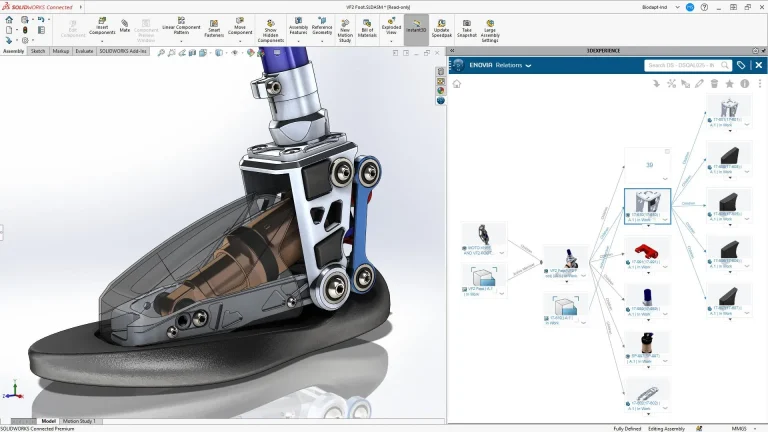
Have you been curious about using the same powerful 3D design software that professionals use, but aren’t ready to commit to a commercial license? If you’re a hobbyist, DIY enthusiast, or just someone looking to explore commercial-grade CAD for personal projects without a significant financial commitment, then 3DEXPERIENCE SOLIDWORKS for Makers is designed for you.
This version of SOLIDWORKS offers a low-cost option specifically geared toward casual projects and non-commercial use. As of March 2024, the cost is remarkably accessible, available for as little as $15 per month or $48 per year.
What’s Included with SOLIDWORKS for Makers?
This package gives you access to 3DEXPERIENCE SOLIDWORKS Professional, providing the same powerful, best-in-class design tools used across industries. You get core functionality for part modeling, assemblies, and drawings, along with advanced capabilities like surfacing, sheet metal, and weldments.
 SOLIDWORKS for Makers package options
Beyond the core CAD, the package also includes several other valuable tools on the 3DEXPERIENCE platform, such as SOLIDWORKS Visualize Connected (for photorealistic renderings), NC Shop Floor Programmer (for CNC machining), and cloud-based parametric and subdivision modeling tools.
How to Purchase SOLIDWORKS for Makers
Unlike a traditional SOLIDWORKS license, the Makers license is not purchased through a Value-Added Reseller and is instead purchased through the online store. The purchase process involves selecting your subscription, adding it to your cart, and completing standard online checkout steps.
Once your order is confirmed, you’ll receive an order confirmation and, crucially, a Getting Started email with a link to access your 3DEXPERIENCE platform once your licenses are ready. After clicking the link, you’ll be prompted to log in to an existing 3DEXPERIENCE account or create a new one. This will be what you use for future access to your profile and, more importantly, install SOLIDWORKS for Makers.
How to Install SOLIDWORKS for Makers
Once logged in to the 3DEXPERIENCE platform, you’ll be greeted with the Welcome app. The Welcome app has a button to directly download SOLIDWORKS, but if that does not appear, you can access the download in other ways.

The Welcome app with a button to install SOLIDWORKS for Makers
To install SOLIDWORKS for Makers:
- Click the Compass in the top left of the screen.
- Expand the My Roles section.
- Select 3DEXPERIENCE SOLIDWORKS Professional from the list.
- Click SOLIDWORKS Connected.
- Follow the prompts to install SOLIDWORKS for Makers.
If this is your first time downloading and installing a tool from the platform, you will need to install the 3DEXPERIENCE Launcher. Fortunately, this is an automatic process, and all you need to do is follow the prompts. The 3DEXPERIENCE Launcher is a small background program that simplifies the installation process.

Downloading and installing the 3DEXPERIENCE Launcher
Once the 3DEXPERIENCE Launcher is installed, you can repeat the steps outlined above to install SOLIDWORKS for Makers. Although licensed through the 3DEXPERIENCE platform, SOLIDWORKS itself is still installed and run locally on your machine, but it provides a simpler installation process than traditional SOLIDWORKS.
Understanding the Different Included Tools
The 3DEXPERIENCE SOLIDWORKS for Makers package includes access to several design applications, and it’s helpful to understand the differences. While you may spend the majority of your time in one or another, there is great benefit in using the comprehensive design package.
SOLIDWORKS Connected
SOLIDWORKS Connected is the core desktop CAD application included in the package. It provides the full SOLIDWORKS Professional functionality that is installed and runs locally on your computer. It uses a parametric modeling approach, building designs based on sketches and features like extrudes, cuts, and revolves. The files created in SOLIDWORKS Connected are standard SOLIDWORKS files.

SOLIDWORKS Connected’s identical interface to traditional SOLIDWORKS
However, a crucial limitation for the Maker version is that these files are digitally watermarked and cannot be opened in any other version of SOLIDWORKS, including commercial or student licenses. If you open a commercial SOLIDWORKS file in the Maker version and save it, it will be permanently marked as a Maker file. You can export neutral file formats like STEP or IGES, but this results in losing the feature history when opened elsewhere.
xDesign on 3DEXPERIENCE
xDesign is a different application that is entirely cloud-hosted and browser-based. It runs within your web browser on the 3DEXPERIENCE platform and does not require a local installation. It is also a parametric modeler and shares many similar buttons and terminology with standard SOLIDWORKS, often feeling like a browser-based version of SOLIDWORKS. xDesign creates a different file type compared to SOLIDWORKS files, but can files can be used in each software much like a normal 3rd-party CAD file.
xShape on 3DEXPERIENCE
xShape is also a cloud-hosted, browser-based program like xDesign. xShape is a subdivision modeling tool using push and pull sculpting tools instead of the parametric features found in SOLIDWORKS or xDesign. This makes it particularly useful for creating freeform, artistic, organic, or ergonomic shapes using subdivision surface tools not typically found in standard SOLIDWORKS. While the final form may be achievable with traditional surface modeling techniques, xShape gives a much more efficient process and is generally easier to use.

Subdivision modeling with xShape to create organic shapes
Moving Beyond a SOLIDWORKS Hobby License
SOLIDWORKS for Makers is an incredibly accessible way to get hands-on with professional 3D design tools for your personal projects. While the tie to the 3DEXPERIENCE platform introduces some differences from traditional SOLIDWORKS licensing and file management, the core design power is there, coupled with a suite of valuable bonus applications.
A Maker’s license is great for people just starting or hobbyists, but it does impose some limitations on revenue-generating activity. As you approach the limits of the SOLIDWORKS for Makers license or want to add additional functionality, it’s time to look into a fully featured, commercial license of SOLIDWORKS. That’s where TriMech and Javelin can help.
Our team has decades of experience in helping businesses get started with SOLIDWORKS, expand their capabilities, or just solve challenges with their design workflows.
To discuss your options for unrestricted, commercial SOLIDWORKS licensing, contact us here.
Cloud Software
Berita Olahraga
Lowongan Kerja
Berita Terkini
Berita Terbaru
Berita Teknologi
Seputar Teknologi
Berita Politik
Resep Masakan
Pendidikan
