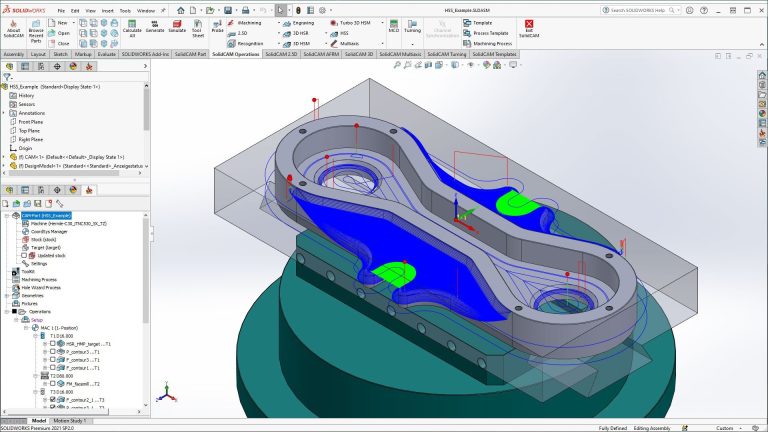
In today’s competitive manufacturing market, it’s crucial to have a CAM system that not only meets the needs of your shop but also elevates your machining process as a whole. That’s why manufacturers of all sizes are switching to SolidCAM, a powerful software that has premium features that instantly increase productivity and efficiency in shops of all sizes.
SolidCAM is quickly becoming the go-to software for modern manufacturers looking to invest in their future for a variety of reasons, but we’ll discuss the top five. Companies all over are switching to SolidCAM to increase their programming efficiency to stay on the cutting-edge of technology.
1. CAD/CAM Integration
First and foremost, SolidCAM integrates right into SOLIDWORKS. Since you’re working in a single window environment, there’s no need to ever export or import 3D models between systems. You also still have access to your whole arsenal of SOLIDWORKS tools.
 SolidCAM integration with SOLIDWORKS
Along with the integration comes the associativity between your toolpaths and your models. What that means is any design changes or revisions on your model will automatically update your toolpaths. This eliminates all rework that’s usually required during this stage of the manufacturing process. All these features instantly bridge the gap between design and manufacturing.
2. SolidCAM iMachining
SolidCAM iMachining is the revolutionary milling technology that directly increases productivity and profitability on your machines. Users have seen anywhere up to 70% in cycle time savings, which nearly triples the output of your mills. Not only does iMachining decrease your time per part, it also raises your tool life anywhere from 5 times or more.

SolidCAM iMachining toolpaths
Users widely consider iMachining to be the best-kept secret in manufacturing today. The patented technology gives a huge competitive edge to shops, allowing owners to quote shorter lead times, opening up their capabilities to allow for more jobs to pass through the shop floor.
3. Complete CNC Machining Capabilities
SolidCAM understands that no two shops are the same. They offer a wide range of toolpaths that cover anything from simple 2-axis milling up to 99-channel Swiss machining. SolidCAM’s licensing is also extremely modular, so users get to pick and choose the exact capabilities they need.

SolidCAM manufacturing operations
These capabilities are also constantly growing. SolidCAM has just released a robust Wire EDM package for all your electrical discharge needs. There are also features like iTurning and Nesting in the works to help increase efficiency in those areas. SolidCAM’s dedicated technical team is always working on new innovations to expand the library of already impressive toolpaths.
4. Automation Tools
SolidCAM offers a range of different functionalities to accelerate the programming process. There is a list of automatic feature recognition tools that will pull information right from your SOLIDWORKS model to instantly create effective toolpaths. For example, the Hole Wizard Process tool automatically pulls information right from the Hole Wizard and creates your tapping and drilling cycles for you.

SolidCAM’s Drag and Drop Templates
The Drag and Drop Templates feature allows us to save toolpaths and reapply them to other CAM parts. So we can take our pocketing toolpath, for instance, and create a template that stores the tool, feeds, speeds, and all our other settings. With that template, we can drag it onto a newly created feature, and it will generate a new toolpath for that geometry in just moments. These templates handle much of the heavy lifting, especially when programming families of parts.
5. Dedicated Support
Besides the software itself, users have been so successful due to the support system we have in place. Trimech offers a range of training courses that allow new users to hit the ground running when they use the software for the first time. Trimech also has a dedicated support team that’s ready to assist with any issues at a moment’s notice.

SolidCAM AI ChatBot
SolidCAM also has a free resource built right into their tools, called the SolidCAM AI Chatbot. This chatbot has every training course, webinar, and tech tip SolidCAM has produced, and stores this info in one central database. You can ask the chatbot any question about the software, and it will generate step-by-step instructions on how to address that desired topic.
Considering Switching to SolidCAM?
There’s no one answer as to why manufacturers are switching to SolidCAM. They offer a variety of tools that improve programming time, cycle time, tool life, and the CAM experience as a whole. Since the software grows to fit programmers’ exact needs, shops of all sizes are converting and seeing instant improvements in their production workflows.
To find out more about how SolidCAM can improve your shop’s capabilities, contact us here.
Cloud Software
Berita Olahraga
Lowongan Kerja
Berita Terkini
Berita Terbaru
Berita Teknologi
Seputar Teknologi
Berita Politik
Resep Masakan
Pendidikan
