Have you ever programmed a job in SolidCAM and wondered how to use the same cutting tools in another part file? In this video, you will learn how to export tools from SolidCAM in a completed part file and import them into a new part file. There are 2 methods you can use, but not everybody knows what the right toolkit file to export as is. We will explore these 2 methods to help you determine which method will work best for you.
Exporting a Machine Tool Setup Library
The first method to export tools from SolidCAM is the Machine Tool Setup Library method. This method is a machine-specific tool setup library and will save the cutting tool alongside the holder. It also includes tool mounting positions on the machine, which is good for lathes, mill-turn, and Swiss machines. Using this method on a lathe will reduce your SolidCAM set-up time and get you programming faster. Once you import the .tlm into your new SolidCAM part file, you are ready to start programming.
In SolidCAM, to export tools in a Machine Tool Setup Library, follow these steps:
- Go to the ToolKit in your CAM-Part.
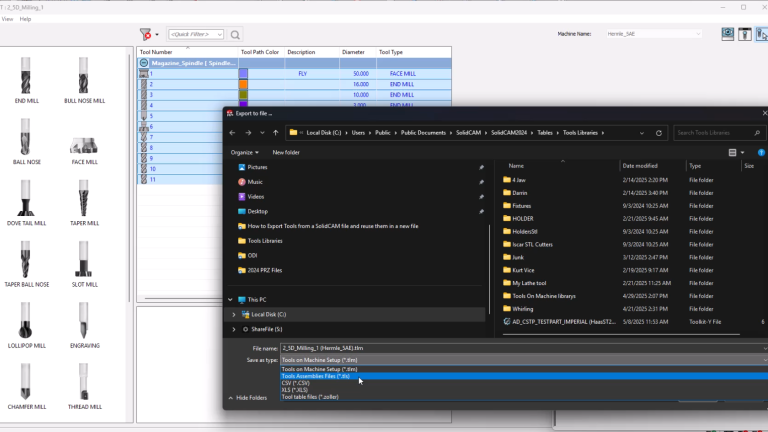
- Go to the top left menu and click File>Export to File.
- Once the browse dialog box pops up, select the file type to export as. In this case, it will be a .TLM file.
- Name the file and then save it.
 Export to file command
Exporting a Tool Assembly Library
The second method to export tools from SolidCAM is the Tool Assembly Library method. This method is useful for creating a general tool library that is not tied to a specific machine. As a result, the library file will include cutting tools and holders but will not include the mounting positions for the machine. Typically, this is useful for milling projects as there is usually a single mounting position on the milling center.
In SolidCAM, to export a Tool Assembly Library, follow these steps:
- Go to the ToolKit in your CAM-Part.
- Go to the top left menu and click File>Export to File.
- Once the browse dialog box pops up, select the file type to export as. In this case, it will be a .TLS file.
- Name the file and then save it.

File types when using Export as File
Additional Methods to Export Tools from SolidCAM
Within SolidCAM, there is an option to export all your components and tool data to an Excel-compatible file using the Export to File command. Similar to the other methods, you can access that through the File>Export to File command. By default, the name of the CAM-Part and machine is used as the default name for the .XLS file.
The Excel file that is generated includes the following information:
- Info – Provides information about the machine type and name.
- Milling – Provides information on all the milling tools available.
- Drilling – Provides information on all the drilling tools available.
- Holders – Provides information on all the holders available.
- Cutting Conditions – Provides the information on all the cutting conditions if they exist.
Additionally, SolidCAM allows the export of tool information to a neutral CSV format. However, using this format has limitations compared to the previously mentioned methods. To export as a CSV file, you can select the file type from the dropdown when exporting your CAM-Part to the file.
The constraints when using a CSV are:
- Only Milling cutters that are parametrically defined can be exported to CSV.
- Tools defined as 3D models cannot be exported to CSV.

Importing into the SolidCAM ToolKit
Regardless of the method chosen, knowing how to export tools from SolidCAM can ensure that you can efficiently reuse tools across all your programmed parts. Staying efficient and working quickly are the best ways to increase throughout of the shop and keep everything moving as smoothly as possible. SolidCAM has many more time-saving features that you can leverage with your current machining workflows to help boost productivity.
Looking to dive deeper into SolidCAM and see how it can benefit your team? Contact us here.
Cloud Software
Berita Olahraga
Lowongan Kerja
Berita Terkini
Berita Terbaru
Berita Teknologi
Seputar Teknologi
Berita Politik
Resep Masakan
Pendidikan
