SOLIDWORKS PDM Professional adds true automation to your users’ workflows. One of the best ways to make use of this automation is through SOLIDWORKS PDM templates.
When I speak to users about templates, the first response is always how they already have templates created for their SOLIDWORKS that are saved inside their vault and shared across the organization. This is excellent and best practice, but CAD template files are not what we are talking about here.
What are SOLIDWORKS PDM Templates?
SOLIDWORKS PDM templates allow us to create new options in the right-click menu and have things like folder structures automatically created. There’s also the ability to create different file types as well, such as SOLIDWORKS CAD files, Microsoft files like Excel or Word, and more.
 SOLIDWORKS PDM templates in the right-click menu
If you have ever been an admin for a large group of folks, especially engineers and other manufacturing professionals, it can become extremely difficult to keep everything in order and make sure everyone is following the company’s standards. With templates, it takes the work away from them and automates these tasks every engineer hates to think about.
How to Create A SOLIDWORKS PDM Template
Creating a new template starts in the SOLIDWORKS PDM Administration tool. After logging in to your vault, towards the bottom of the list of options, you will see Templates. Right-click on this and create a new template.

Editing a SOLIDWORKS PDM template
You also have the ability to export and import templates to easily share custom templates internally or externally. If you want to create a sandbox vault, you can also easily transfer templates to your production vault once verified.
Template Permissions
When I was an admin, I had a group of engineers who were brilliant designers, but tended to always go off track when it came to creating and deleting folders all over the place. They each had their own idea of what organized looked like, which was great in their own sandbox folders I had them design in, but when it came to production, I needed a serious set of rules to make sure the many people on the floor using PDM to look up blueprints knew what they were looking for.
The Execute As tab is what allowed those engineers to still use templates to create new folders (with their correct naming convention, layers, and permissions) without having to ask an admin to do it for them. Execute As can make a template use a different user’s permissions to do things like create folders that the user may not be able to.
Template Cards
Do you need specific metadata to be added to the files you create with templates? The Template Cards section is where this takes shape.
Template Cards will pop up when your users use their right-click menu to create something from a template. It is just like a data card anywhere else in SOLIDWORKS PDM; you can customize it with drop-downs and advanced buttons to make sure the data you need gets applied to the files that need it.
Files and Folders
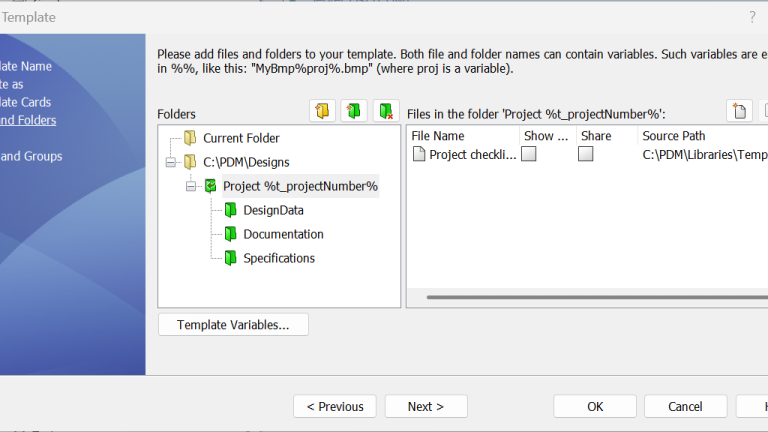
The Files and Folders section is where you decide on the folder structure, files created, and ultimately decide on the directions that SOLIDWORKS PDM uses when something is made from a template.
The creation of these files and folders can be tailored with custom variables. There is also a right-click property menu that can go even deeper with permissions and data cards. The configurability of the SOLIDWORKS PDM templates can be truly tailored to fit your needs.

Adding files and folders to the template
Folder Structure
The left side is going to be your folder structure. For example, for every new project I create, I need a top-level folder, then three subfolders for specifications, design, and other documentation. This is where I would spell out what I want that to look like.
File Structure
The right side is where we can add templates of files. The best practice is to have a template folder somewhere inside your vault so that you can save the file templates for SOLIDWORKS PDM to grab whenever someone makes something new.
Users and Groups
Being a feature in SOLIDWORKS PDM, you can set up the permissions exactly the way you need them. This goes for the creation of Users and Groups as well.
The templates can be set to be seen by certain groups, certain users, everyone, or administrators only. It is all in how you set it up.
Extending SOLIDWORKS PDM Customization
SOLIDWORKS PDM Professional’s template creation ability is one of the strongest additions to your arsenal when upgrading your data management environment. Did you know that there are many more ways that PDM can be customized to meet your company’s needs?
Beyond templates, SOLIDWORKS PDM can be customized with workflows, automated tasks, and company-specific variables. Even further, it can be connected to external systems to ensure that data flows between your vault and ERP/MRP systems.
Click here to learn more about the advanced Power Suite for SOLIDWORKS PDM.
Berita Terkini
Berita Terbaru
Daftar Terbaru
News
Berita Terbaru
Flash News
RuangJP
Pemilu
Berita Terkini
Prediksi Bola
Technology
Otomotif
Berita Terbaru
Teknologi
Berita terkini
Berita Pemilu
Berita Teknologi
Hiburan
master Slote
Berita Terkini
Pendidikan
Resep
Cek Ongkir Cargo
Togel Deposit Pulsa
Daftar Judi Slot Online Terpercaya
Slot yang lagi gacor
