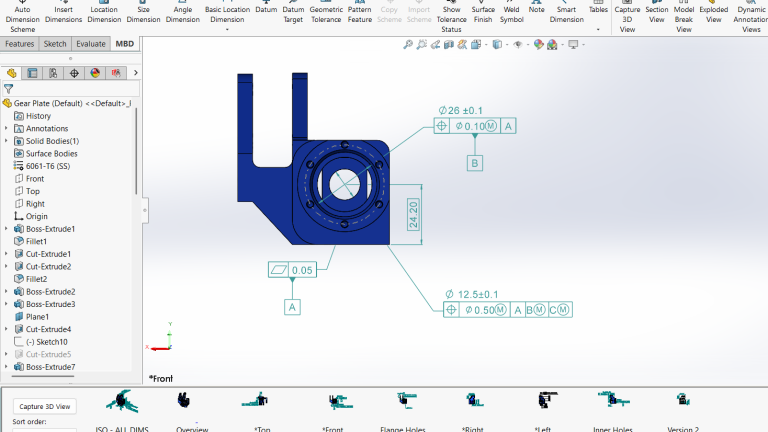
Engineers have always relied on 2D drawings to help convey design intent and communicate critical information about their models. However, model-based definition (MBD) provides a unique opportunity to provide product and manufacturing information directly on the 3D model.
With the emerging standards for MBD, it is important that your CAD software enables your team to efficiently produce all the necessary product manufacturing information on your parts and assemblies. SOLIDWORKS MBD helps engineers cut down on time and reduce mistakes while still providing high-quality information.
Why Use Model-Based Definition?
Introducing model-based definition and moving away from traditional manufacturing prints might seem like a bold direction to take. However, there are a few key reasons that leveraging the 3D in-context annotations can benefit your team.
- Fewer chances for miscommunication on critical manufacturing information due to unclear annotations in a drawing sheet set. With SOLIDWORKS MBD, viewers can see the exact design intent in context within the 3D model.
- Reduce the time it takes to create and update 2D drawings. Since the annotations are kept within the model, any changes in design automatically update the required documentation without requiring the opening of any other files.
- Increase the overall understanding of the design intent across multiple departments that may not have or be familiar with CAD. Export your 3D model with embedded PMI to 3D PDFs that can be opened and shared with anyone who has a PDF reader.
 Built-in 3D PDF templates for model-based definition
 - Meet and comply with certain standards for digital product definition, such as MIL-STD-31000 and ASME Y14.41. SOLIDWORKS MDB supports these standards and enables companies to meet compliance requirements without relying on traditional drawings.
What is SOLIDWORKS MBD?
In simplest terms, SOLIDWORKS MBD allows engineers to call out design and manufacturing information, including dimensions and welds, directly within the 3D modeling environment. Annotated views of parts and assemblies can be filled with important title block information, bill of materials, surface finishes, notes, and any other PMI data needed.

Communicating important product and manufacturing information in SOLIDWORKS
SOLIDWORKS MBD also supports various industry standards, such as ASME Y14.41 and ISO 16792, and allows you to use customized templates for multiple deliverables. Finally, users can publish their 3D models with included annotated views to eDrawings, 3D PDF,s or STEP 242 files.

3D model annotations and views can be exported and viewed directly in eDrawings
Integration with Existing Workflows
As part of the SOLIDWORKS ecosystem, MBD allows you to work right within your part and assembly files without having to switch into other applications to create annotated drawing sheet sets.
SOLIDWORKS Integration
Capture all the design information you’ve already entered to create your models and add additional information without extra steps. As you rework and revise your designs, there’s no double-duty to reflect those changes into your callouts as they update alongside your model automatically.

Edits to your GD&Ts can be completed right within the SOLIDWORKS modeling environment
PDM and PLM Integration
PDM and PLM users will enjoy how MBD data can be versioned, controlled, and migrated through a workflow just like standard 2D drawings. Additionally, clients looking into SOLIDWORKS MBD can still use the 2D drawings they are accustomed to creating and sending out, but now in a smarter, more hybrid workflow.

SOLIDWORKS MBD uses DimXpert to automatically add dimensions and tolerances to parts.
For example, you can use your defined 3D parts and assemblies for manufacturing and inspection while still creating 2D drawings for record keeping or complying with regulatory requirements. Since all data is captured with MBD, capturing the views with the required annotation is already completed, so 2D drawing creation becomes much more efficient.
Manufacturing Integration
Finally, communicating information downstream to suppliers, manufacturers, or inspectors is made clearer using MBD and 3D PDFs. Both CNC and CMM software can read the data displayed in SOLIDWORKS models defined through MBD, which means a cut in manual data entry and improved accuracy throughout the product lifecycle.
Getting Started with Model-Based Definition
Are you ready to streamline your documentation and take your workflow to the next level? Embrace SOLIDWORKS MBD and experience a new way to clearly communicate your designs to teammates, suppliers, manufacturers, and even clients.
As with anything new, the best way to get started is through a formal training class led by an instructor. TriMech Group offers a SOLIDWORKS Model-Based Definition course both virtually and online. The course is designed to cover everything pertaining to MBD, from adding manufacturing callouts and tolerances to capturing 3D annotated views and even using the PDF template editor.
To learn more about implementing model-based definition in your engineering workflow, contact us here.
Berita Terkini
Berita Terbaru
Daftar Terbaru
News
Berita Terbaru
Flash News
RuangJP
Pemilu
Berita Terkini
Prediksi Bola
Technology
Otomotif
Berita Terbaru
Teknologi
Berita terkini
Berita Pemilu
Berita Teknologi
Hiburan
master Slote
Berita Terkini
Pendidikan
Resep
Cek Ongkir Cargo
Togel Deposit Pulsa
Daftar Judi Slot Online Terpercaya
Slot yang lagi gacor
