The 3DEXPERIENCE platform is a powerful business experience designed to help organizations create collaborative experiences for their customers. While data on the platform is easily searchable, mastering 3DEXPERIENCE filters can greatly streamline finding the exact model or document you are looking for.
Filters allow users to efficiently manage and organize data, making it easier to focus on specific tasks and projects. Proper data organization is paramount to the success of your business, and mastering 3DEXPERIENCE filters is the best way to get started.
What is the 3DEXPERIENCE Platform?
The 3DEXPERIENCE platform is a collaborative environment that provides software solutions for various departments within an organization, from marketing and sales to engineering. It offers a single, easy-to-use interface that powers industry solution experiences based on 3D design, analysis, simulation, and intelligence software.
This platform enables businesses to innovate and create products and services using virtual experiences, providing a real-time view of business activity and ecosystem. The platform is available on-premises and in public or private cloud, making it accessible and flexible for different organizational needs.
Why Data Organization is Important
The 3DEXPERIENCE platform seamlessly connects people, data, and processes within a unified environment, breaking down silos between departments. This integration fosters collaboration and ensures that all stakeholders have access to the information they need, when they need it. As more stakeholders integrate into a unified system, the need to sort and organize becomes hyper-relevant.
 Data organization with 3DEXPERIENCE Bookmarks
One of the key features that enhances productivity and streamlines workflows on this platform is the use of 3DEXPERIENCE filters. Filters allow users to efficiently manage and organize data, making it easier to focus on specific tasks and projects.
The Role of Filters on the 3DEXPERIENCE Platform
Filters are essential tools within the 3DEXPERIENCE platform that help users to:
- Organize Data Efficiently: Filters allow users to sort and categorize data based on specific criteria, making it easier to find and manage information. This is particularly useful in collaborative environments where multiple users are working on different aspects of a project.
- Enhance Collaboration: By using filters, teams can focus on relevant data and collaborate more effectively. For example, engineers can filter out design-related data, while marketing teams can filter out consumer experience data, ensuring that each department works with the information most pertinent to their tasks.
- Improve Productivity: Filters help in reducing the time spent on searching for specific information. Users can quickly apply filters to narrow down their search results, allowing them to work more efficiently and focus on value-adding activities.
- Create Visual Experiences: The 3DEXPERIENCE platform aims to enable clients to create immersive experiences for their consumers. Filters play a crucial role in this process by ensuring that all relevant data is easily accessible, allowing for more informed decision-making and better product development.
How to Use 3DEXPERIENCE Filters
A platform filter allows users to access critical data without loading the entire product. For very large products, it would be smart only to open and manipulate the data that the user needs to see.
To get the most out of filters on the 3DEXPERIENCE platform, consider the following tips:
- Define Clear Criteria: Before applying filters, define clear criteria based on your project requirements. This will help you to sort data more effectively and ensure that you are working with the most relevant information.
- Use Multiple Filters: The platform allows users to apply multiple filters simultaneously. This can be particularly useful for complex projects where data needs to be sorted based on various parameters.
- Regularly Update Filters: As projects evolve, so do the data requirements. Regularly update your filters to ensure that they remain relevant and effective.
- Collaborate with Your Team: Share your filter settings with your team to ensure consistency and collaboration. This will help in maintaining a unified approach to data management and project execution.
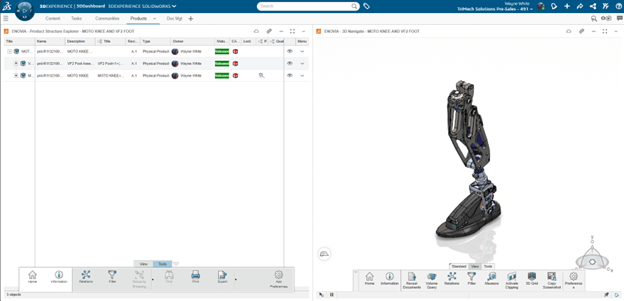
Below, I’ve loaded the Product Structure Explorer web app. This is a wonderful app that allows users not only to visualize the CAD data but also to understand the product structure on the web. A user can directly create a filter from the bottom action bar.

A SOLIDWORKS assembly opened in Product Structure Explorer
3DEXPERIENCE filters allow users to leverage a selection, attribute, configuration, or volume option. In this case, I chose Selection and explicitly chose the objects that I wanted visible in the Filter.

3DEXPERIENCE filter options for creating and opening
The filter is a separate database object. Users can identify a filter by searching for the word “filter”. Since it is a database object, filters can have their own lifecycle process in 3DEXPERIENCE. As seen below, I only see the filtered components in 3DNavigate.

3D Navigate filtering a SOLIDWORKS assembly
Using 3DEXPERIENCE Filters in SOLIDWORKS
Inside SOLIDWORKS, users can leverage a myriad of web apps. One of the best ways of using filters is via the Bookmark Editor and dragging the filter into the SOLIDWORKS session. This is great, because the application is only requesting those files designated in the Filter.

Using 3DEXPERIENCE filters in SOLIDWORKS
More Than Just Filters
3DEXPERIENCE filters are a powerful feature of the 3DEXPERIENCE platform that can significantly enhance productivity and collaboration. By organizing data efficiently, improving collaboration, and creating immersive experiences, filters help users to work more effectively and achieve their project goals.
Filters are a very powerful way to leverage efficient loading of data. It is a 3DEXPERIENCE object that allows anonymity (any user can create filters) and delivers downstream performance and workflow benefits.
To learn more ways that 3DEXPERIENCE can enhance productivity, watch our on-demand webinar here.
Cloud Software
Berita Olahraga
Lowongan Kerja
Berita Terkini
Berita Terbaru
Berita Teknologi
Seputar Teknologi
Berita Politik
Resep Masakan
Pendidikan
