As simulation becomes more central to product development, the demand for faster, more accessible workflows is growing. Engineers are increasingly looking for ways to reduce the time and expertise required to run complex simulations without compromising accuracy.
Artificial intelligence (AI), particularly in the form of no-code tools and machine learning models, is emerging as a powerful solution to benefit even the most experienced simulation analyst.
TriMech Group at NAFEMS
TriMech Group engineers recently supported two papers at the National Agency for Finite Element Methods and Standards (NAFEMS) Conference, highlighting progression in the AI and simulation space. The papers demonstrated how simulation workflows can evolve from proof-of-concept automation to fully functional, AI-driven design tools. These developments offer a compelling narrative to share that AI is not just for data scientists anymore; it’s becoming a practical tool for every design engineer.
 Predicting complex results with AI tools
Validating the Workflow With A Proof of Concept
The first paper, presented by TriMech at the NAFEMS Americas conference in July 2024, focused on validating a foundational question: Can a simulation engineer, without coding expertise, train a neural network on simulation data using a no-code interface?
This was not about deploying a large language model or building a production-ready AI system. Instead, it was a proof of concept to demonstrate that a basic neural network could be trained on simulation results from a standard FEA tool like SOLIDWORKS Simulation. The goal was to automate part of the simulation process to predict reaction forces when the user inputs specific geometry info, such as thickness.

Comparing SOLIDWORKS Simulation results
The workflow involved:
- Running a parametric study in SOLIDWORKS Simulation. Variables used were thickness and prescribed displacement.
- Extracting simulation results (e.g., displacement, stress values).
- Feeding this data into a no-code AI training environment.
- Training a neural network to predict outcomes based on new input parameters.
Only numerical values were captured, and the physics of the model was not used for training the neural network. This laid the groundwork for more advanced applications by proving that the data pipeline and training process were feasible and accessible to non-AI experts.
From Concept to Case Study Using KeyWard’s LLM Platform

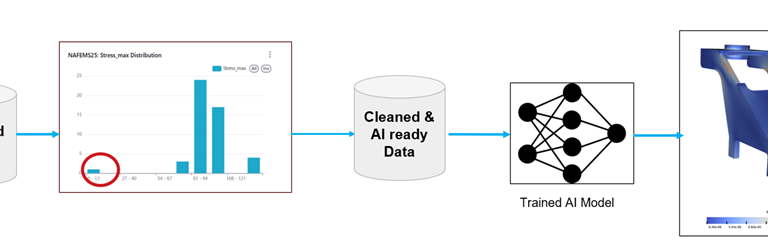
Going from extracted data to a predictive AI model
Building on the first paper’s foundation, the second paper was co-authored by TriMech at the NAFEMS World Congress 2025. This paper presented a full case study using KeyWard’s AI platform.
This time, the focus shifted from validating the workflow to applying it in a real-world scenario using a large language model (LLM) trained on simulation data. The actual simulation physics was captured to predict the stress contours.
KeyWard’s platform provided a structured, no-code interface designed specifically for engineering use cases. The case study involved:
- Training the LLM on a curated dataset of simulation results. Dimensions that varied the size/geometry of the CAD model and corresponding Von Mises stresses were used for training the LLM.
- Using the model to predict structural performance metrics (e.g., stress) across new design configurations.
- Evaluating how much data was needed to achieve reliable predictions.
The key advancement here was usability. The interface allowed simulation engineers to interact with the model without needing to understand the underlying AI architecture. The model could generalize across different simulation scenarios, reducing the need to run hundreds of individual simulations. This not only saved time but also opened the door to more iterative, exploratory design processes.
Defining the Workflow From Simulation to AI-Driven Insight
Together, these two papers outline a clear and repeatable workflow for integrating AI into simulation:
- Simulation Setup: Run the Simulation study in SOLIDWORKS Simulation or SIMULIA on 3DEXPERIENCE. Set up parametric studies or run different design iterations manually for data generation.
- Data Extraction: Export relevant simulation results (e.g., stress, displacement, mesh data).
- Data Preparation: Use a no-code tool to clean and structure the data.
- Model Training: Train a neural network or LLM on the dataset.
- Prediction & Analysis: Use the trained model to predict outcomes for new designs without rerunning simulations.
This workflow enables engineers to identify trends, optimize designs, and reduce simulation overhead without needing to become simulation experts.
Why This Matters For The Future of AI Tools
For users of SOLIDWORKS and other simulation tools, this progression is more than just a technical achievement; it’s an opportunity for future growth. The two papers presented by the TriMech Group demonstrate that not only are simulation tools becoming more accessible by providing a lower barrier of entry, but they are becoming even more valuable by adding AI tools.
The journey from proof of concept to full case study shows that AI in simulation is not just possible but also practical. Combining SOLIDWORKS Simulation with AI tools, engineers can now automate parts of their workflow, reduce simulation time, and make better design decisions faster. Whether they’re just starting with simulation or looking to scale their capabilities, AI-powered, no-code tools offer a compelling path forward.
Interested in the AI tools currently available in SOLIDWORKS? Watch our on-demand webinar here.
Cloud Software
Berita Olahraga
Lowongan Kerja
Berita Terkini
Berita Terbaru
Berita Teknologi
Seputar Teknologi
Berita Politik
Resep Masakan
Pendidikan
