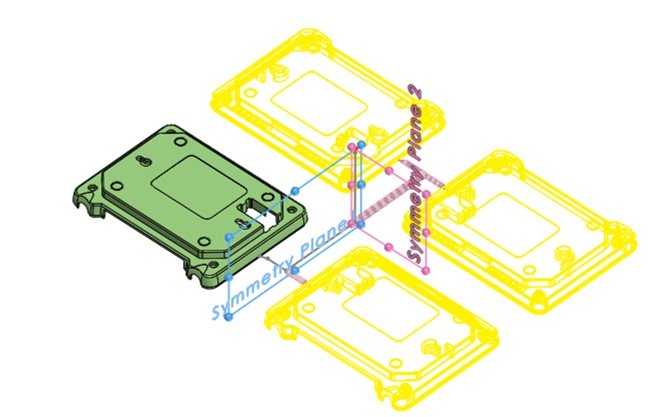
Multi-cavity injection molding allows manufacturers to produce multiple parts in a single cycle. One of the key design principles that can significantly enhance the efficiency and quality of these molds is symmetry. Using SOLIDWORKS Plastics, engineers can leverage symmetry to optimize mold design, reduce costs, and improve product consistency.
Symmetry in multi-cavity molds refers to the balanced and mirrored arrangement of cavities around a central axis. This design principle ensures that the flow of molten plastic is uniform across all cavities, minimizing variations and defects in the final products. SOLIDWORKS Plastics provides powerful simulation tools that allow engineers to visualize and analyze the flow of plastic within the mold, making it easier to design symmetrical molds.
 Making a symmetrical mold setup
What is the Symmetry Boundary Condition
SOLIDWORKS Plastics Professional and SOLIDWORKS Plastics Premium offer a symmetry boundary condition option to create and analyze cavity as well as runner layouts that are symmetric about one or two planes of symmetry.
The Symmetry option is intended for use with two or higher number of mold cavities with a symmetrical runner system. For example, a two-cavity mold with a symmetric runner can be reduced to a one-cavity mold analysis. Likewise, to reduce a four-cavity mold can be reduced to a two-cavity analysis or even further, to half its original value. Note that it is easier to compile accurate symmetrical results by splitting a symmetrical runner system into equal sections than attempting to predict accurate results by splitting the entire cavity domain into sections.

Selecting the Symmetry boundary condition
Using Symmetry in SOLIDWORKS Plastics
Symmetry boundary conditions can be applied to sketch-based runner domains or solid-body-based runner and cavity domains. The default selection for cavity and runner domains is the solid-body-based type, namely “Along Solid body”. In the Symmetry boundary condition Property Manager, the option titled Symmetry 1 allows for specifying faces of the cavity or runner domain that correspond to one plane of symmetry. The Symmetry 2 option allows specifying a second plane of symmetry.

Using symmetry for a multi-cavity injection molding study
Surfaces identified as Symmetry Faces behave as thermally insulated. This prevents heat loss through the symmetry faces. When using the Symmetry boundary condition, it is important to make sure that mold cooling layouts produce symmetric mold temperatures.
If the mold temperature distribution is not symmetric, it is not appropriate to assume the Symmetry condition. In that case, one has to rerun the analysis, including the complete cavity and runner layout along with the mold cooling channels for accurate simulations.
Multi-Cavity Injection Molding Simulations
When using the Symmetry boundary condition, SOLIDWORKS Plastics will only run the simulation for a single portion of the layout. However, the results can be displayed for the complete layout. As a result, you can get high-quality results for your complex multi-cavity molds in a fraction of the time.

SOLIDWORKS Plastics symmetric results
Using the Cyclic Boundary Condition
Similar to the Symmetric boundary condition, the Cyclic boundary condition can be used to analyze cavity and runner layouts that exhibit cyclic symmetry. The image below shows cyclic symmetry defined for the cavity and runner layout that are symmetric about a central axis. The Symmetry and Cyclic options are only supported for use with the Fill simulations, Pack simulations, and Warp simulations.

A multi-cavity mold with cyclic symmetry
As the demand for high-quality, cost-effective plastic parts continues to grow, the importance of efficient mold design cannot be overstated. Symmetry in multi-cavity molds, facilitated by advanced tools like SOLIDWORKS Plastics, offers a pathway to achieving these goals. By embracing symmetry, manufacturers can not only improve their production processes but also unlock new levels of innovation and efficiency. Imagine a future where every plastic part is produced with perfect consistency and minimal waste. With SOLIDWORKS Plastics, that future is within reach!
To learn more about using SOLIDWORKS Plastics in your workflow, contact us here.
Cloud Software
Berita Olahraga
Lowongan Kerja
Berita Terkini
Berita Terbaru
Berita Teknologi
Seputar Teknologi
Berita Politik
Resep Masakan
Pendidikan
