While bills of materials are typically created and consumed from a SOLIDWORKS drawing, sometimes it is useful to export bills of materials to be consumed separately. By exporting the BOM, you have a disconnected copy that can easily be sent to purchasing, a client, or a vendor for necessary supplies.
Historically, SOLIDWORKS PDM has had the ability to export BOMs into an Excel/CSV file, which was viewable by anyone with spreadsheet capabilities. With the introduction of SOLIDWORKS PDM 2025, we can now export bills of materials with thumbnails to add even more information for downstream consumers.
How to Export Bills of Materials
Within PDM, you navigate to an assembly and look at the “Bill of Materials” tab in File Explorer, you would see a BOM calculated from the SOLIDWORKS files. This is extremely useful for users internal to your PDM vault and allows them to view assembly and component information without having to open the drawing in SOLIDWORKS or find a paper print.
 SOLIDWORKS PDM calculated bill of materials
However, if someone external to your vault needs the BOM, you would need to give them access, whether through the PDM installed client or Web2. SOLIDWORKS PDM makes it easy to export the BOM with just a few clicks. All you need to do is navigate to the top right of the BOM in SOLIDWORKS PDM and export as a CSV file.

Export BOM from SOLIDWORKS PDM
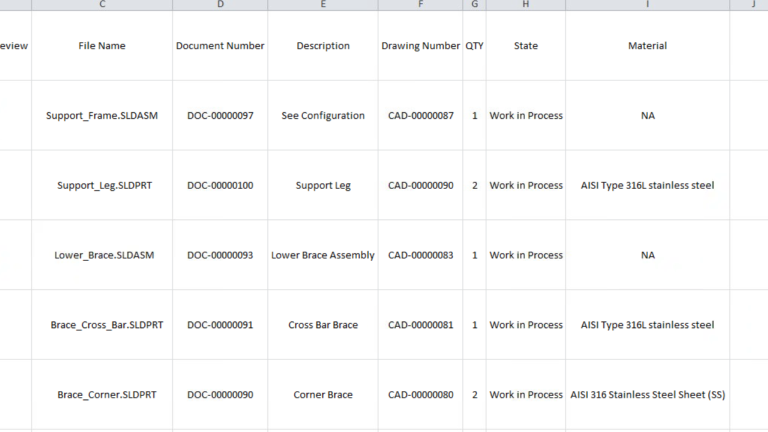
The newly created CSV file contains the entire BOM structure as displayed within SOLIDWORKS PDM. At this point it can be fed into an ordering system or opened in a spreadsheet program for better visibility.

An exported BOM in Excel
Exporting Bills of Materials with Thumbnails
With past releases, the information mentioned above is as far as we could take it. The previous BOM exports contained all the information needed for purchasing, but lacked a crucial piece of information needed to fully understand the components: a thumbnail.
Now you can choose to include thumbnails, a handy visual indicator of the contents of the BOM. It’s just as easy to make the Excel file with those, simply by choosing that option and opening the Excel file as shown below. Of course, once you’ve exported you can adjust the sizing of the image as with any embedded image in an Excel worksheet.

Exported BOM with thumbnails
The uses of this feature are numerous, but for purchasing and manufacturing, it’s a handy tool that lets you see the necessary components at a glance. The thumbnails are generated directly from SOLIDWORKS PDM’s eViewer and show the model in isometric, by default.
To learn about the other enhancements in SOLIDWORKS PDM 2025, watch our video here.
Cloud Software
Berita Olahraga
Lowongan Kerja
Berita Terkini
Berita Terbaru
Berita Teknologi
Seputar Teknologi
Berita Politik
Resep Masakan
Pendidikan
