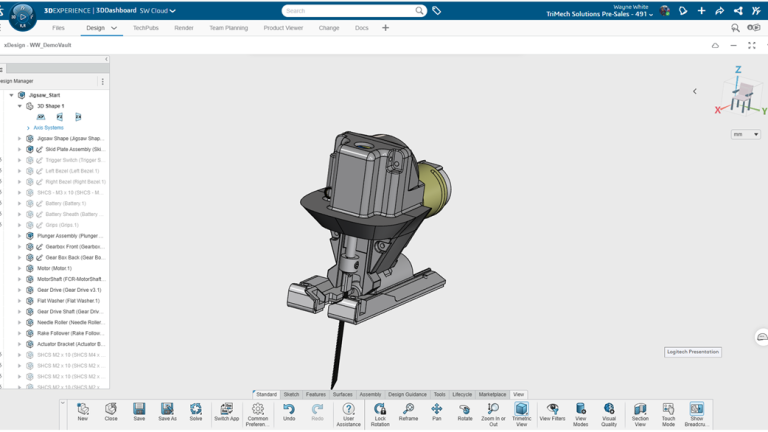
Assembly drawings are important at the end of the design process to capture manufacturing information. Designers need a way to document the parts with respect to the whole product assembly. Drawings traditionally indicate a product list with a bill of materials table further detailing the assembly makeup.
The SOLIDWORKS xDesign portfolio includes xDrawing. As the name indicates, this web app allows users to create drawings and documentation, both in 2D and 3D forms. We discuss how you can use these tools to create 3DEXPERIENCE assembly drawings completely on the web with no installation required.
Model-Based Definition In The Browser
The foundation has been set for Model-Based Definition (MBD) to define product manufacturing information to be adopted by more manufacturing centers. MBD allows for all the dimensioning, notes, and tolerancing to be done at the model level, connected directly with the design. Designers have embraced modeling in the 3-dimensional space for the last 30 years, so why not create manufacturing information at the 3D level too? With that said, xDrawing allows for both 2D and 3D definition to ease a transitioning world toward an always-moving finish line. Though we can still create paper prints if needed!
With our Jigsaw design, let’s transition over to the manufacturing-ready environment. That application is xDrawing. A simple press of the letter ‘x’ on the keyboard allows us to change from one design app to another.

Creating an xDrawing Bill of Materials
For today, let’s focus on a smaller group of parts that make up the gearbox. We can easily hide or show components in the tree or the selection toolbar. As we can see in the tree, our Model Definition Manager is on the left. This includes our model information along with views and annotations. I’ve turned on command names on the bottom action bar, and I found the Bill of Materials command.

Accessing the Bill of Materials command
As one would expect, the bill of materials can be modified both in the properties that we leverage (Title, Description, etc.), but also in the more basic font size and type, along with the table size. We can also export the BOM, if needed, into a CSV file.
The BOM table can be easily cleaned up to just show the title, item number, and quantity. I’ve also inserted various balloon callouts to the parts I want depicted in this view. Balloon callouts can reference datum planes, so when I insert a top or front view, the related balloons can come along with the model view.

A completed xDrawing bill of materials
So far, everything that has been captured is connected to the model in the 3D space. I’ll switch to the drawing environment so I can create a more traditional paper drawing with various views and tables.
Creating 3DEXPERIENCE Assembly Drawings
Inserting model views is as easy as dragging the established views into the paper sheet. Changing the model view scale can be done quickly to better encompass the available sheet size. I’ve changed our view scale and BOM table size to clean this up quite a bit. Typically, I show the isometric view in a shaded state, which is easily done with a few clicks.

Changing the view shading type
xDrawing is a web app included with the SOLIDWORKS xDesign portfolio. It allows for documentation of your design work to start producing the parts and products, all in a web browser, in a very predictable and easy manner. Leveraging these tools reduces the reliance on dedicated engineering hardware for 3DEXPERIENCE assembly drawings and opens the door for your team to work on any device.
To learn more about xDrawing or the other apps included with SOLIDWORKS xDesign, click here.
Cloud Software
Berita Olahraga
Lowongan Kerja
Berita Terkini
Berita Terbaru
Berita Teknologi
Seputar Teknologi
Berita Politik
Resep Masakan
Pendidikan
